Key Takeaways
- Every major CTV platform wants 16:9 video. None of the ones we checked accept a vertical or square ad as a full-screen spot.
- Build to 1920x1080, progressive, at 23.976 or 29.97 frames per second. Those are the only two frame rates every platform on this list accepts.
- Cut exactly :15 and :30 versions. Some platforms reject a spot that's even a second off.
- Mix audio to -24 LKFS, with peaks no higher than -6 dBTP. That's the standard streaming platforms hold ads to.
- Keep key content away from the edges, the top-right corner and the bottom-right corner, where timers, badges and QR codes appear.
- The specs get your ad accepted. They don't make it work. That still comes down to writing for sound, the couch and no click.
CTV ads get rejected for boring reasons. A file that's 31 seconds instead of 30. A frame rate one platform doesn't accept. Black bars from a vertical ad dropped into a landscape frame. Audio that's too loud.
Each rejection costs days, and every platform publishes its specs in a slightly different place with slightly different rules.
So we pulled them together. Below are the creative specs for the major CTV platforms, taken from each platform's own spec pages as of October 2026, plus a single master file that clears almost all of them. Platforms update these pages, so check the source before a big delivery.
The Short Version: One Master File That Works Almost Everywhere
If you only make one set of files, make this one.
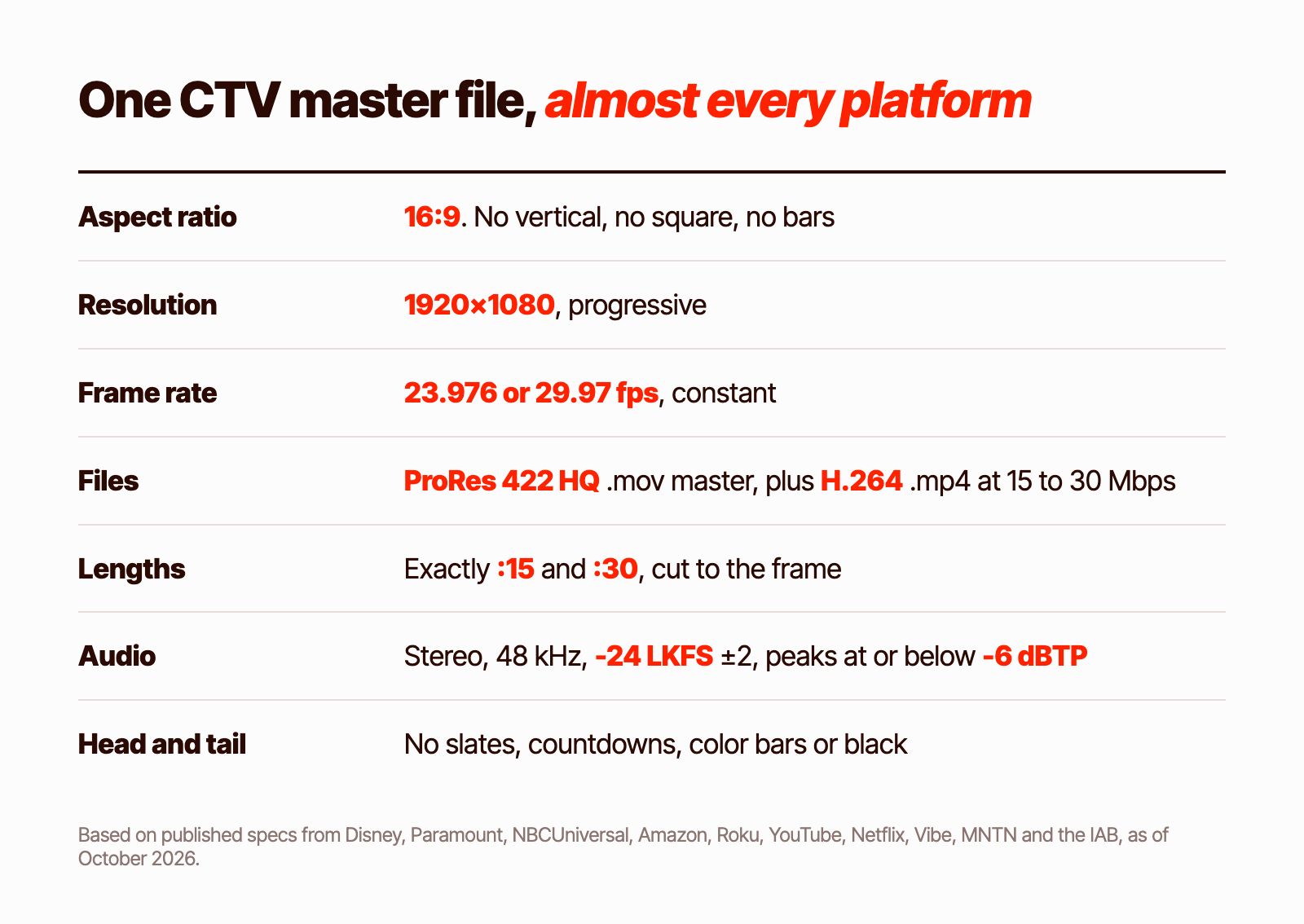
- Aspect ratio: 16:9
- Resolution: 1920x1080, progressive
- Frame rate: 23.976 or 29.97 fps, constant. Roku rejects 24 and 30.
- Files: a ProRes 422 HQ .mov master, plus an H.264 High Profile .mp4 at 15 to 30 Mbps
- Smaller versions: an MP4 under 500 MB for Amazon, and under 100 MB for Vibe
- Lengths: exactly :15 and :30, cut to the frame
- Audio: stereo, 48 kHz, -24 LKFS ±2, true peak at or below -6 dBTP
- Clean start and end: no slates, countdowns, color bars or black leaders
That combination meets or beats the published minimums for every platform below that publishes specs.
CTV Ad Specs by Platform
| Platform | Lengths | Resolution | Video file | Max file size | Audio |
|---|---|---|---|---|---|
| Hulu / Disney+ (Disney Campaign Manager) | 5 to 90s | 16:9, 1080p preferred, 720p accepted | ProRes 422 HQ preferred, or H.264. MOV or MP4 | 1.9 GB (250 MB if Hulu-served) | Stereo, 44.1 or 48 kHz |
| Paramount+ (Paramount Ads Manager) | :15 or :30 | 16:9, 720p minimum | H.264 MP4 preferred, or ProRes MOV. 6 Mbps+ | 10 GB | AAC, 48 kHz, -24 LUFS ±2, peaks under -6 dB |
| Peacock (NBCUniversal) | 6 to 60s (90s on request) | 1920x1080 mezzanine | ProRes 422 HQ or H.264, 10 to 30 Mbps | 10 GB | 48 kHz, -24 LKFS ±2 |
| Prime Video (Amazon DSP) | :15, :30, :45, :60 | 1920x1080 minimum | H.264 MP4, 15 Mbps+ (50 recommended) | 500 MB | AAC, 192 kbps+ |
| Roku (Roku Ads Manager) | 6 to 92s | 16:9 | H.264 or ProRes 422 HQ, 6 Mbps+, 23.98, 25 or 29.97 fps only | 1 GB | PCM or AAC, 48 kHz, English audio |
| YouTube (TV screens) | 6s bumpers, up to 30s non-skippable on TV, skippable any length | 16:9, 1080p recommended | Uploaded as a YouTube video | n/a | n/a |
| Netflix | :10 to :30 pre-roll, up to :75 mid-roll | 16:9, 1080p preferred, 720p accepted | ProRes MOV preferred, or H.264 MP4 (12 Mbps+ at 1080p) | About 1 GB recommended | -24 LKFS ±2, peaks at or below -2 dB |
| Vibe | 5 to 90s | 16:9, 720p minimum, 1080p recommended | MP4 only | 100 MB | Mix level guidance only |
| MNTN | Exactly :15 or :30 | 1920x1080 or higher | MP4 or MOV, 15 to 30 Mbps | 4 GB | AAC, required |
Tubi, Max and Tatari don't publish public in-stream video specs. Ask your rep or buying platform for the current sheet.
Platform Notes Worth Knowing
The table covers the basics. These are the details that cause rejections.
Hulu and Disney+
Disney says 1:1 and 9:16 videos will be rejected. Wider film ratios are accepted only if they sit inside a 16:9 frame. QR codes are allowed, subject to review, and review can take up to five business days. See Disney's video ad specs.
Paramount+
Self-serve spots must be :15 or :30, with no black bars, leaders, slates or countdowns. It's one of the few platforms that publishes a peak ceiling: never above -6 dB. See Paramount Ads Manager specs.
Peacock
NBCUniversal reserves a small area in the lower left of the frame for its countdown and copy, so keep text out of that spot. It serves ads through VAST and doesn't accept VPAID. See NBCU's programmatic video guidelines.
Prime Video
Amazon has the highest bitrate floor on this list, 15 Mbps, and the smallest common file limit at 500 MB, so you may need a separate export. Letterboxing and pillarboxing are strongly discouraged. Standard ads can't include button-style calls to action like "learn more," because the viewer can't click them. See Amazon's Prime Video ad specs.
Roku
Roku only accepts 23.98, 25 or 29.97 fps. A 24 or 30 fps file will be rejected. The most common rejection, per Roku, is a spot longer than 92 seconds. Audio must be in English, with Spanish subtitles allowed. See Roku's creative requirements.
YouTube on TV Screens
YouTube's 16 to 30 second non-skippable format serves mainly on TVs, and Google says 30 second assets must be horizontal. Square or vertical versions won't run. For YouTube TV lineups, lengths need to land within a second of :30 or :60. See Google's video ad formats.
Netflix
Netflix is the most detailed about layout. It allows letterboxing but doesn't recommend it, and black bars can never take up more than 37% of the screen. Keep the top right clear for the ad timer, keep content inside the outer edges, and keep the bottom right clear when a QR code might be added. Video and audio tracks must match within half a second. See Netflix's creative specs.
Vibe and MNTN
The self-serve platforms are strict about length. MNTN accepts exactly :15 or :30 and rejects slight variations. Vibe allows 5 to 90 seconds but fails an upload that's even a second over, and caps files at 100 MB. Both reject vertical video. See Vibe's video specs and MNTN's file requirements.
Aspect Ratio: Why Your Vertical Meta Ad Won't Work
Every platform here is 16:9. Not one accepts a 9:16 or 1:1 ad as a full-screen spot, and several reject them outright.
You can technically drop a vertical video into a landscape frame with bars on each side. Most platforms either ban that or strongly discourage it, and even where it's allowed, it fills less than a third of the screen and looks like an afterthought on a 65-inch TV.
If your best ads are vertical, you have two real options: recut them from wider footage, or rebuild the concept in landscape. We wrote about choosing between the two in your best TV ad is probably already running on Meta.
Lengths: Cut to the Frame
:15 and :30 are the safe bet. Every platform here takes them, and they're the only lengths some self-serve platforms accept.
Length is checked precisely. MNTN rejects slight variations, Vibe fails an upload that runs a second over, and YouTube TV wants lengths within a second. Export to the exact frame count, not "about 30 seconds."
Longer spots have a place. Netflix mid-rolls run up to :75, Prime Video takes :45 and :60, and Roku and Disney accept up to about 90 seconds. But you'll still need :15 and :30 versions for most buys.
Audio: -24 LKFS Is the Number
TV viewers are listening, and platforms are strict about how loud you can be.
- Loudness: -24 LKFS ±2 is the target Paramount, Peacock and Netflix publish, and the IAB recommends for US CTV. It comes from the ATSC A/85 standard behind the CALM Act. The law itself covers TV stations and cable and satellite providers, but streaming platforms hold ads to the same standard.
- Peaks: the strictest published ceiling is -6 dBTP, from Paramount and the IAB. Netflix allows peaks up to -2 dB. Mixing to -6 clears both.
- Format: stereo, 48 kHz. PCM in the master file, AAC at 192 kbps or higher in the MP4.
A spot mixed for social, loud and compressed to compete in a feed, will usually fail or be turned down. Mix for TV separately.
Safe Zones and QR Codes
TV screens crop edges, and platforms put their own interface on top of your ad. Keep the important parts of your frame clear of these areas.
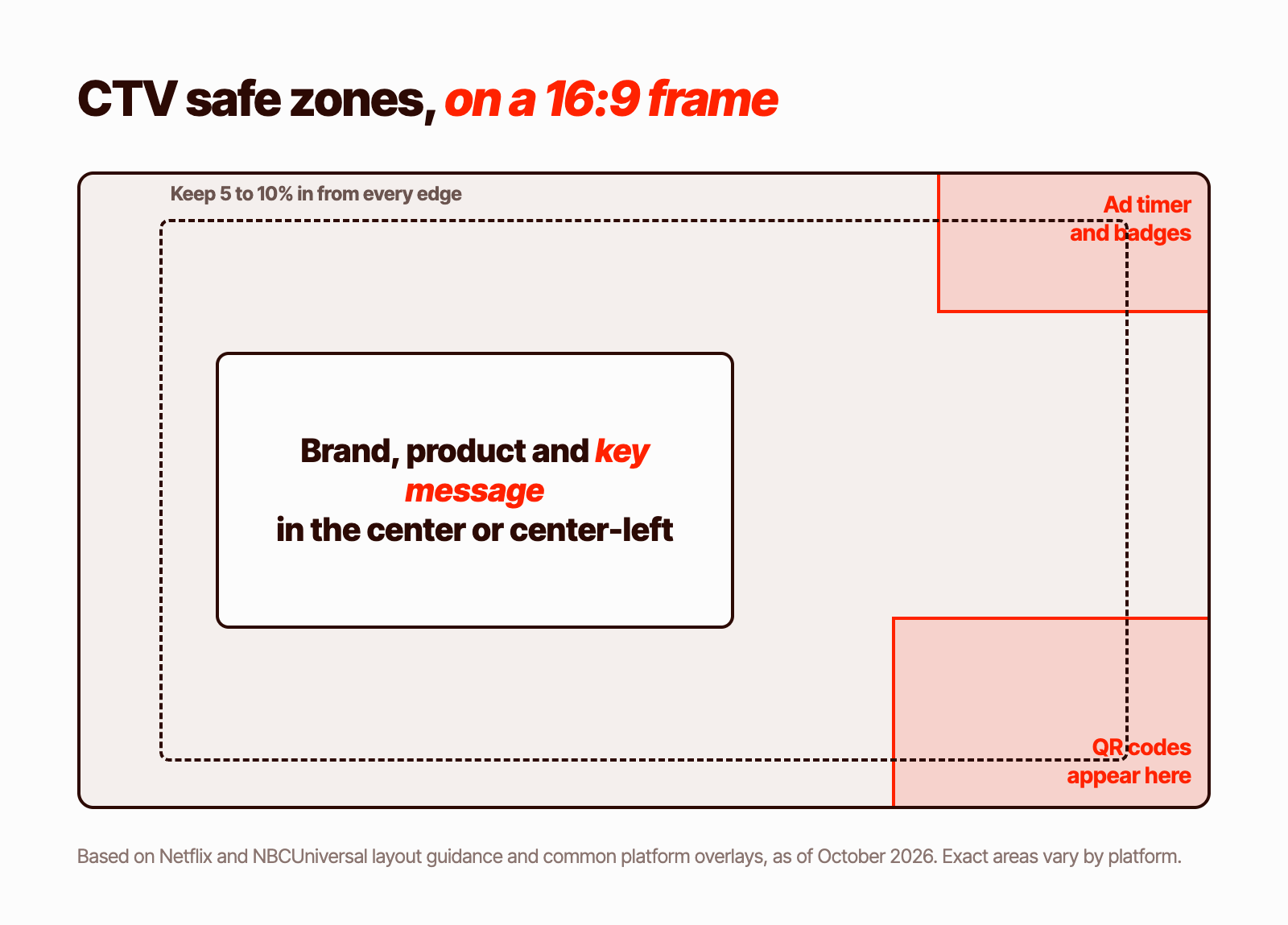
- Edges: keep text and logos 5 to 10% in from every edge, per Netflix's guidance. Older TVs and some apps crop the frame.
- Top right: ad timers and "Ad" badges appear here on Netflix and Max.
- Bottom right: platforms place QR codes here. Netflix asks you to keep roughly the bottom-right quarter clear when one may appear.
- Center or center-left: the safest place for your product, brand and key message.
QR codes are handled differently everywhere. Disney accepts burned-in QR codes, subject to review. Netflix and Amazon generate their own on pause ads, and Netflix doesn't allow advertisers to add one there. If you add your own, keep it on screen long enough to scan and big enough to read from the couch.
Pause Ads and Other Formats
Several platforms now sell ads that appear when a viewer pauses. These are static images, not video, with their own specs:
- Netflix: a transparent PSD or PNG, 2592x2160 recommended, with the right side kept clear for the player interface.
- Prime Video: a 1920x1080 background image, a logo and a short headline. Amazon adds the QR code.
- Max: a 1920x1080 static PNG or JPEG under 1.5 MB, with the top right kept clear.
Roku also offers action ads with an overlay logo and short message, and the IAB is finalizing standards for formats like pause, squeezeback and overlay ads. Expect these specs to change.
What the Specs Don't Tell You
Meeting the specs gets your ad approved. It doesn't make it good. A spot can be a perfect 1080p, -24 LKFS, 30-second file and still not work, because it was built for a phone.
- Write for sound. CTV viewers are listening. The voiceover or dialogue should carry the message without captions.
- Get the brand in early. On YouTube, viewers can skip after five seconds. On any platform, people look away.
- Make text big and brief. If you can't read it from across the room, it isn't doing anything.
- Give people a way to act without clicking. A short URL, an offer or a QR code, on screen long enough to remember.
- Make versions, not one spot. Different openings and lengths give you something to learn from.
For the full process, see the ultimate guide to making CTV ads.
See CTV ad examples made to these specs.
CTV Delivery Checklist
Before you send files, check that:
- The video is 16:9 at 1920x1080, progressive, with no bars.
- The frame rate is 23.976 or 29.97 fps, constant, throughout.
- The length is exactly :15 or :30 (or the length the buy calls for), to the frame.
- There's no slate, countdown or black at the head or tail.
- Audio is stereo, 48 kHz, -24 LKFS ±2, with peaks at or below -6 dBTP.
- Video and audio tracks are the same length.
- You have a ProRes master and an H.264 MP4 at 15 to 30 Mbps, plus smaller MP4s for platforms with low file limits.
- Text, logos and key product shots sit inside the safe area, away from the top right and bottom right.
- Any QR code is allowed on that platform, readable from the couch and on screen long enough to scan.
- You've checked the platform's current spec page for anything that changed.
How We Handle CTV Delivery at Biddyco
Our CTV and YouTube creative agency makes 15 and 30 second landscape spots and delivers them to each platform's specs, with the same U.S.-based team that makes our clients' social ads. We've made CTV and YouTube spots for brands like Uber Eats, iHerb, Maximus and Project Food Box.
If you're comparing partners, our buyer's guide to hiring a CTV creative agency covers what to ask. Or book an intro call to talk through your account.
FAQ
What aspect ratio do CTV ads use?
16:9. Every major platform we checked requires landscape video for full-screen ads, and several reject vertical or square files outright.
What resolution should a CTV ad be?
1920x1080. Some platforms accept 1280x720, but Amazon requires 1080p at minimum, so 1080p is the safe standard.
How long should a CTV ad be?
15 or 30 seconds. Every platform accepts those lengths, and some self-serve platforms accept nothing else. Cut them exactly, because some platforms reject a spot that's even a second off.
What frame rate should a CTV ad be?
23.976 or 29.97 fps, constant. Those are the only rates accepted everywhere on this list. Roku rejects 24 and 30 fps.
How loud should a CTV ad be?
-24 LKFS ±2, with true peaks at or below -6 dBTP. That's the loudness standard streaming platforms and the IAB use for US ads.
Can I run a vertical video as a CTV ad?
Not as a full-screen spot. Recut it from wider footage or rebuild it in landscape. Black bars around a vertical video are banned or discouraged on most platforms.
What file format do CTV platforms want?
A ProRes 422 HQ .mov master and an H.264 .mp4 cover almost every platform. Some self-serve platforms accept MP4 only, and some have small file size limits, so keep compressed versions ready.
Do all CTV platforms publish their specs?
No. Tubi, Max and Tatari don't publish public in-stream video specs. Ask your rep or buying platform for the current requirements.